
In 1992 we used a basic monitor that looked more like small portable TV with a black screen and green text that was always left-justified to send an email. Email messages would be sent using a line or two of code with your message, press enter, then wait for the cursor to start blinking whenever a message was received. That was the basis of high-tech. No cute little notification bell or fancy "you've got mail" in the '90s and absolutely nothing to fear.
Fast forward to 2022 – one email can take over your computer, access your private documents, download malware, and lock you out of your computer among other unbeknown threats. That's one bad step for man, one giant malware for mankind if you ask me.
"Email spam senders, or spammers, regularly alter their methods and messages to trick potential victims into downloading malware, sharing data, or sending money." – Rahul Awati, Taina Teravainen, techtarget.com
Over the years email has helped advance the speed of business communications and helped others keep in touch with family without the need for a mailman or the "Forever Stamp" (always represents the current price of a one (1) ounce First-Class Mail postage) first promoted by the USPS (United States Postal Service) on April 12, 2007.
As not only an entrepreneur but one that helps other entrepreneurs market their businesses, I've seen hundreds of thousands of emails in my day. Everything from promotional emails, email marketing, auto-reply, and drip campaigns, to Constant Contact, MailChimp, Keap, GMAIL, Hotmail, Yahoo Mail, EarthLink, and beyond. In nearly 30 years I've managed to avoid most email phishing scams and spam messages to a fault.
Identifying and avoiding email phishing scams
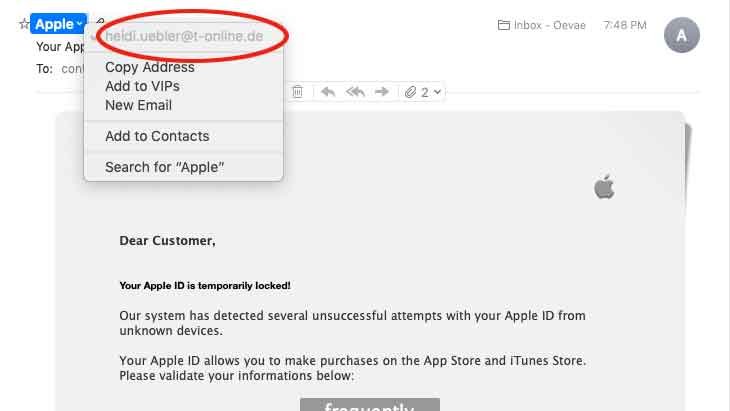
I've found that always looking at the "reply email address" of the email you received is your most efficient line of defense. No, I don't trust spam blockers because hackers can be pretty tricky when it comes to navigating around well-known fences.
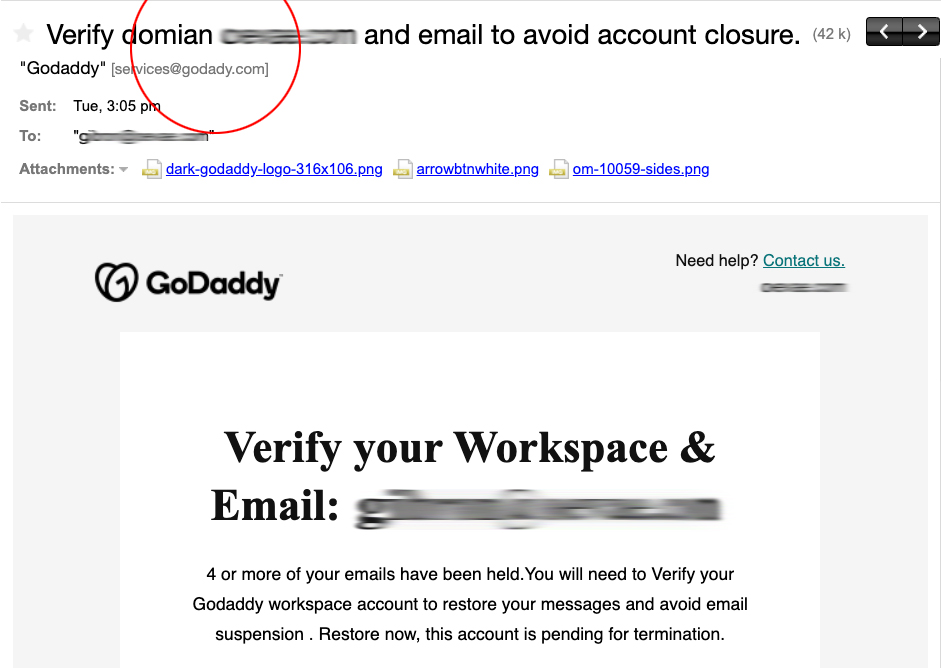
In fig. 1 screenshot is phishing of an actual email said to be from Godaddy, yet the reply email address says has a typo and reading "Godady.com" which can easily be overlooked.
Don't open suspicious emails
Marking spam as spam when an unsolicited email makes an appearance in your inbox, never just delete it. Spam refers specifically to unsolicited bulk email (UBE). Unsolicited is the key word there. For example, You provide your email address to a company in order to download a business plan template. The company then begins emailing you updates about new products or related content. While the emails about new products or related content may be unwanted, they're not spam. Why? Technically speaking, You solicited them by giving the company your email address, which very well might sell your email address to another company. If this second company starts sending you emails, that's spam. Why? The emails from the second company are both unsolicited and unwanted because you never gave your email address to that second company.
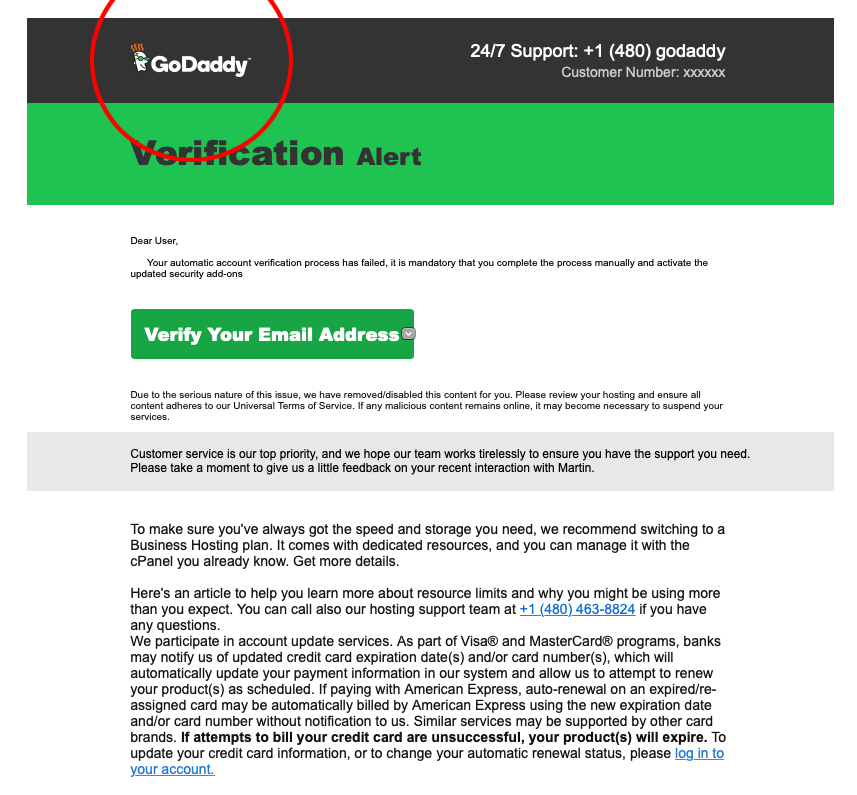
Spam emails are almost always commercial and driven by a financial motive. These hackers try to promote and sell questionable goods, make false claims and deceive You into believing something that's not true. Don't be bamboozled by the use of the logo.
In Fig. 3 screenshot is a phishing email using an outdated version of the Godaddy logo.
The difference between spam and phishing
The primary difference between spam and phishing is that, although they both may be big nuisances:
• Phishing is actively aiming to steal login credentials and other sensitive data.
• Spam is a tactic for hawking goods and services by sending unsolicited emails to bulk lists.
Don't forward emails to your friends or website designer
Forwarding your suspected emails to your friends or website designer will only spread the mayhem. I've found that one of the best courses of action is to notify the "proposed" company of the spam by forwarding them the emails:
- Godaddy abuse@godaddy.com
- PayPal spoof@paypal.com
- Square spoof@squareup.com
- American Express spoof@americanexpress.com
- Apple reportphishing@apple.com
- USPS (United States Postal Services) spam@uspis.gov
- FTC (Federal Trade Commission) reportphishing@apwg.org
- Constant Contact abuse@constantcontact.com
- SquareSpace reportphishing@squarespace.com
- Wix security-report@wix.com
- Weebly abuse@Weebly.com
- Shopify safety@shopify.com
- Webflow form-spam-reports@support.webflow.com
- Jimdo privacy@jimdo.com
- BlueHost tos@Bluehost.com
Most phone carriers in the U.S. allow you to report phishing text messages by forwarding the message to 7726 or SPAM. The Global System for Mobile Communications (GSMA) has designated 7726 (spells SPAM) for reporting spam texts, and most U.S. carriers are part of the program.
An example of a spambot could be using the bot to distribute links to an email phishing scam.
Try using (at) or _at_ and (dot) or _dot_ on website pages to avoid having email addresses found by spambots that search for a regex that matches email address formatting. By using _AT_ and _DOT_, the symbols that the spambot is looking for will not show up on the page, and therefore your email address will not be found. (Credit: Stack Overflow)
Over half of all global email traffic is spam
According to Cisco Systems, some 320 billion spam emails are sent every day, and 94% of malware is delivered via this medium. Search by IP, domain, or network owner for real-time threat data. Spam is always annoying, sometimes amusing, and often dangerous. According to Google, its Gmail service blocks more than 100 million phishing emails every single day.
You might also think for veterans like me who have had the same email company and email address for more than 20 years, and maybe it's a bit late to start using aliases, but think again. It's never too late to start dealing more effectively with the problem of email spam and phishing.
Related Content: Using Free Email Accounts for Business (Podcast: Morning Joe with Gibrón)
Make a brand difference.™